
The C kit API
Use BUI's runtime directly from C. Nodes, properties, layout, the context and host, windows, events and custom nodes, all from one header.
- C
- C++
The kit is BUI’s runtime, written in C, and BUI_kit.h is its whole public API. Use it directly and you get Blender’s widgets, layout, input handling and damage rendering with nothing in between: no interpreter, no garbage collector, one static library.
It’s a retained-mode API: you build a tree of widgets once, change their properties when your data changes, and the kit redraws only what changed.
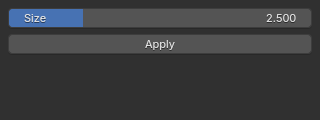
examples/kit_hello.c, rendered headless at 320 × 120.Link it
Add BUI to your CMake project and link bui::kit (it pulls in bui::gpu and bui::core):
add_subdirectory(BUI)target_link_libraries(myapp PRIVATE bui::kit)Then #include "BUI_kit.h". The header is the reference: every function has a one-line comment. The installation page covers compilers and platforms.
The shape of a kit program
Every kit program does the same five things. Here they are, from examples/kit_hello.c:
#include <stdio.h>#include "BUI_kit.h"
static void on_event(void *data, BKNode *node, int kind, void *ref, double a, double b){  if (kind == BK_EV_CLICK) {    printf("clicked %s\n", BK_get_str(node, "text"));  }  else if (kind == BK_EV_CHANGE) {    printf("%s = %g\n", BK_get_str(node, "label"), BK_get_num(node, "value"));  }}
int main(void){  BKNode *root = BK_node_new("frame");              /* 1. build a tree */  BK_set_num(root, "padding", 8);
  BKNode *size = BK_node_new("slider");  BK_set_str(size, "label", "Size");                /* 2. set properties */  BK_set_num(size, "min", 0);  BK_set_num(size, "max", 10);  BK_set_num(size, "value", 2.5);  BK_node_add(root, size, -1);                      /* -1: append */  BK_geom_set_manager(size, BK_GEOM_PACK);          /* 3. lay it out: Tk's packer */  BK_geom_set(size, "fill", 1);                     /* fill x */
  BKNode *apply = BK_node_new("button");  BK_set_str(apply, "text", "Apply");  BK_node_add(root, apply, -1);  BK_geom_set_manager(apply, BK_GEOM_PACK);  BK_geom_set(apply, "fill", 1);  BK_geom_set(apply, "pady0", 6);
  BKContext *ctx = BK_context_new(root);            /* 4. a context and a host */  BKHost host = {0};  host.emit = on_event;                             /* the window fills in the rest */  BK_context_set_host(ctx, &host);
  if (BK_window_supported()) {                      /* 5. a window and its loop */    BKWindow *win = BK_window_new(ctx, "BUI from C", 320, 120);    BK_window_show(win);    BK_window_run();    BK_window_free(win);  }  else {                                            /* no window system: render to a raster */    BuiRaster *r = BUI_raster_create(320, 120);    BK_render(ctx, r, 320, 120, 1);    BUI_raster_free(r);  }  BK_context_free(ctx);  BK_node_free(root);  return 0;}
Build it from a clone of BUI with cmake -S . -B build -DBUI_BUILD_EXAMPLES=ON, then cmake --build build --target bui_kit_hello. The C tutorial walks through it line by line. The rest of this page is the map.
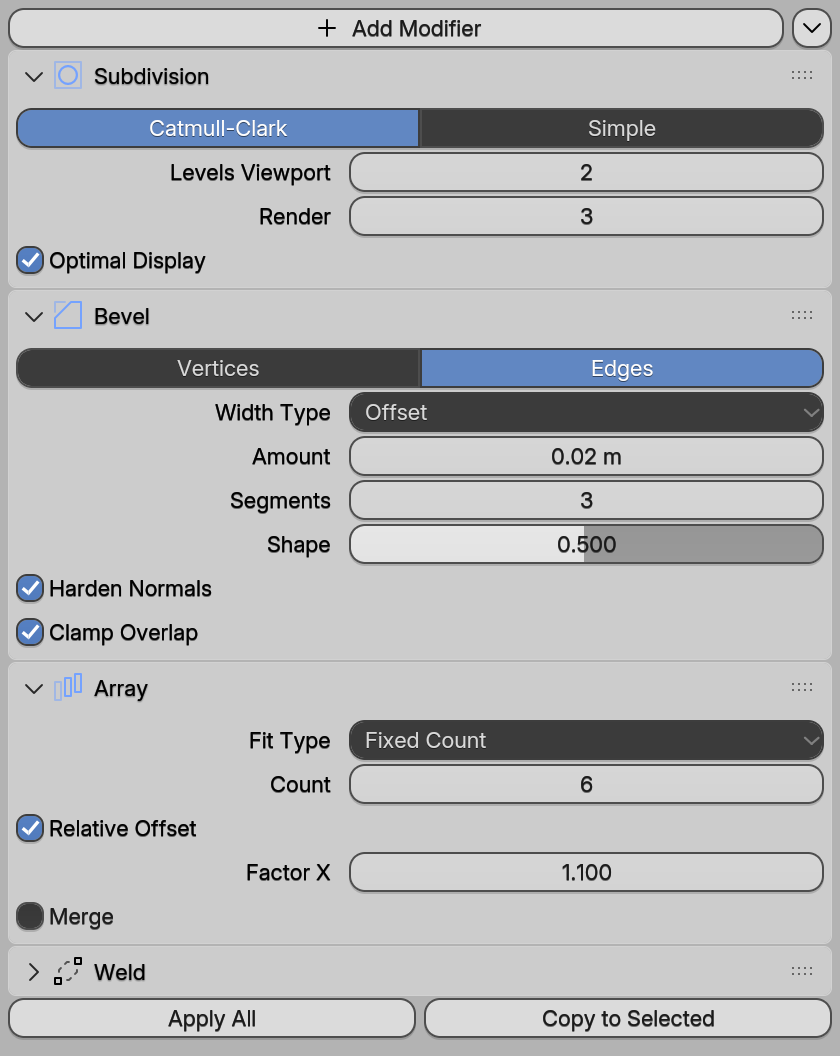
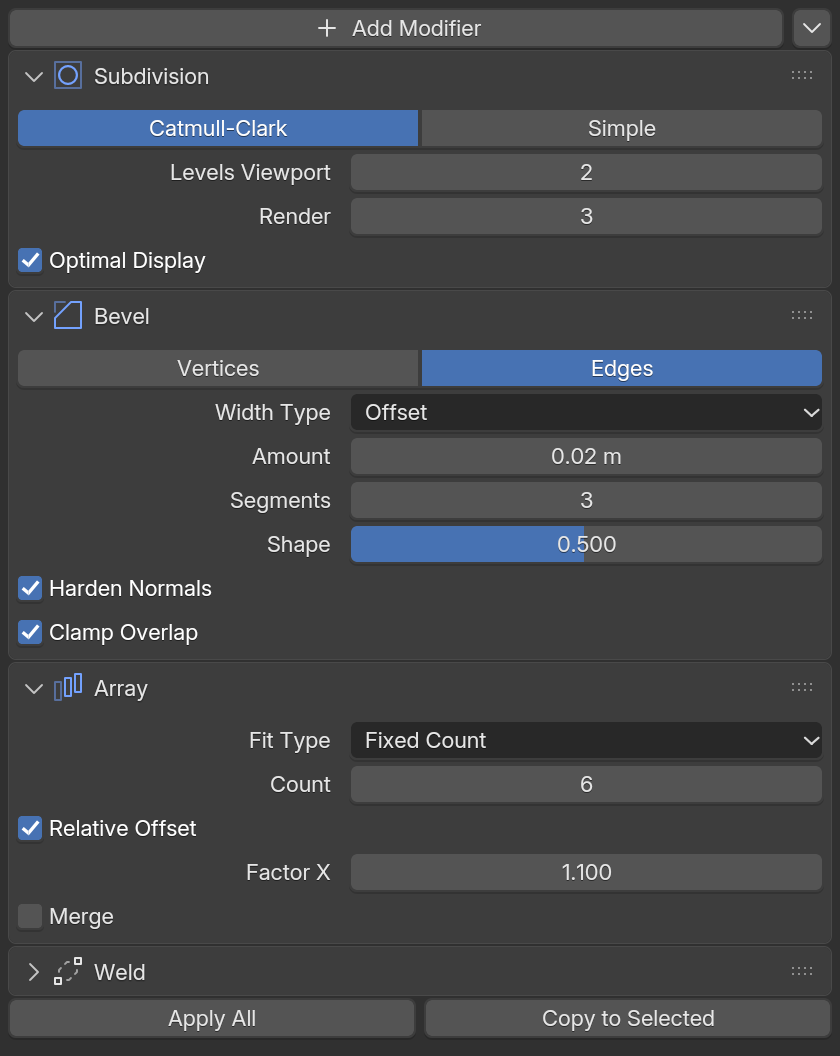
examples/site/kit_modifiers.c.Nodes
A node is one thing in the interface: a button, a slider, a panel, a whole file browser. Create one by type name, then add it to a parent.
BKNode *panel = BK_node_new("panel");BK_node_add(root, panel, -1); /* index -1 appends */| Function | What it does |
|---|---|
BK_node_new(type), BK_node_free(node) |
Create and free |
BK_node_add(parent, child, index), BK_node_remove(parent, child) |
Change the tree |
BK_node_child_count, BK_node_child, BK_node_parent |
Walk it |
BK_node_rect(node, rect), BK_node_natural(node, size) |
Where it is, and the size it wants |
BK_node_invalidate(node) |
Redraw it |
BK_node_relayout(node) |
Its size or structure changed |
The node types: frame column row grid box panel tabs sidetabs scroll scrollbar label separator progress button toggle checkbox radio decorator text search hotkey number slider dropdown enum swatch popover menubutton menubar list tree gridview canvas textarea image ramp curve normal histogram meter filebrowser custom.
Properties
Nodes are configured by named properties, so the API stays small:
BK_set_str(field, "label", "Width");BK_set_num(field, "value", 1.5);double w = BK_get_num(field, "value");
const char *modes[] = { "Object", "Edit", "Sculpt" };BK_set_strs(dropdown, "items", modes, 3);- Setters and getters:
BK_set_num,BK_set_str,BK_set_color,BK_set_strs, andBK_get_num,BK_get_str,BK_get_color,BK_strs_count,BK_strs_get. - Unknown keys make a setter return 0, so typos don’t pass silently if you check.
"value"vs"set_value": setting"value"changes the value quietly. Setting"set_value"changes it and notifies your host, as if the user had done it.- Common keys:
"value","text","label","min","max","items","enabled","visible". - The browser look:
"html"set to 1 draws a node like a browser’s form control instead of Blender’s. Values, events and the other properties behave the same.
The full list of keys lives in kit_props in kit/intern/kit_core.c.
Layout
The kit lays out the children of a frame (or canvas) with three geometry managers, ported from the Tk toolkit: pack stacks children along a side, grid puts them in rows and columns, and place positions them exactly:
BK_geom_set_manager(child, BK_GEOM_GRID);BK_geom_set(child, "row", 0);BK_geom_set(child, "column", 1);BK_geom_set(child, "sticky", BK_ANCHOR_W | BK_ANCHOR_E);BK_frame_grid_weight(frame, 1, 1, 1.0, 0); /* column 1 stretches */| Manager | Keys (numbers) |
|---|---|
BK_GEOM_PACK |
side (0 top, 1 bottom, 2 left, 3 right), fill (1 x, 2 y, 3 both), expand, anchor, padx0, padx1, pady0, pady1, ipadx, ipady |
BK_GEOM_GRID |
row, column, rowspan, columnspan, sticky (BK_ANCHOR_* bits), plus the pads |
BK_GEOM_PLACE |
x, y, relx, rely, width, height, relwidth, relheight, anchor |
With any manager, reqwidth and reqheight override the natural size. BK_frame_grid_weight(frame, column_axis, index, weight, minsize) sets how grid rows and columns stretch.
The context and the host
A context (BKContext) is one interface’s live state: input, popups, focus and undo. A host (BKHost) is whoever shows it on screen: a native window, Qt, a game engine, a test.
BKContext *ctx = BK_context_new(root);BKHost host = {0};host.data = my_state;host.emit = on_event;BK_context_set_host(ctx, &host);The host is a struct of optional callbacks:
| Callback | When the kit calls it |
|---|---|
request(data) |
It needs a render |
set_cursor(data, cursor) |
The pointer shape should change (BK_CURSOR_*) |
warp(data, x, y) |
The pointer should move (scrubbing a number field) |
clipboard_get(data), clipboard_set(data, text) |
Copy and paste |
schedule(data, ms, timer) |
Call BK_timer(ctx, timer) in ms milliseconds |
emit(data, node, kind, ref, a, b) |
Something happened that your app cares about |
A BKWindow fills in all of them except emit, which you keep. If you host the kit yourself, the embedding page shows how.
Input goes in through BK_press, BK_release, BK_motion, BK_wheel, BK_scroll (precise deltas), BK_key, BK_key_release, BK_button and BK_context_menu. Each returns non-zero when something changed.
Frames come out of BK_render(ctx, raster, w, h, full). It redraws only damaged regions (unless full) and returns how many it redrew: 0 means nothing changed.
Events
Your emit callback gets (data, node, kind, ref, a, b). The kinds you’ll use most:
| Kind | Meaning |
|---|---|
BK_EV_CHANGE |
A node’s value changed |
BK_EV_CLICK |
A button was pressed |
BK_EV_CALL |
A menu item or hotkey fired: call ref |
BK_EV_SUBMIT |
A text field was confirmed with Enter |
BK_EV_RENAME, BK_EV_ACTIVATE, BK_EV_TOGGLE, BK_EV_BROWSE |
List and tree renames, double-clicks, toggle columns, path-field browse buttons |
Set a node’s "events" property to also get raw input: PRESS, RELEASE, DOUBLE, MOTION, ENTER, LEAVE, KEY, KEYRELEASE, WHEEL and CONFIGURE. Scroll views add VIEW (with "viewevents") and SCROLL.
Keyboard shortcuts are one line: BK_bind(ctx, "ctrl+s", ref) sends BK_EV_CALL with your ref.
Windows
BKWindow *win = BK_window_new(ctx, "Tool", 640, 480);BK_window_show(win);BK_window_run(); /* until every window closes, or BK_window_quit() */BK_window_free(win);- Platforms: native Win32, X11 and Cocoa windows.
BK_window_supported()is 0 where there’s no window host, and on macOS off the main thread (AppKit allows windows only there). - Control:
BK_window_close,set_title,set_size,get_size, andBK_window_wm(win, key, a, b)for the rest:"pos","minsize","maxsize","resizable","topmost","alpha","state","lift","lower","focus". - Your own loop:
BK_window_pump()handles pending messages and returns the number of open windows.BK_window_timer(win, ms)sets a one-shot timer;BK_window_set_callbacksgets youon_timer,on_closeandon_frame. - Other threads:
BK_window_wake_init(cb)on the loop’s thread, thenBK_window_wake()from any thread makes the loop callcbsoon. That’s how Node.js drives BUI’s UI thread.
On the GPU: BUI_gpu_set_default(1) puts every new window on the GPU (Direct3D 11 on Windows, OpenGL 3.3 on Linux); BK_window_set_gpu(win, 1) does it for one window. The device starts in the background, so the first frames use the software raster, and BK_window_gpu(win) returns 1 once frames draw on the GPU. The BUI_GPU=1 or 0 environment variable overrides both.
Custom nodes
A custom node hands its drawing and input to you. Use it for your own editor, or to host another UI system: Dear ImGui runs on one.
static int my_event(void *data, BKNode *node, const BKCustomEvent *e) { return 0; }static void my_draw(void *data, BKNode *node, BuiRaster *r, const int rect[4]){  const float blue[4] = { 0.28f, 0.45f, 0.70f, 1.0f };  BUI_raster_fill_rect(r, rect[0], rect[1], rect[2], rect[3], blue);}
BKCustomClass cls = {0};cls.event = my_event;cls.draw = my_draw;BKNode *node = BK_node_new("custom");BK_custom_set(node, &cls, my_data);eventgets every pointer event over the node (all three buttons, with a grab while one is held), precise wheel deltas, and keys and text while it has focus. Return 1 if you used the event.frameruns at the start ofBK_renderwhen you asked withBK_custom_request_frame(node, ms): the place for immediate-mode UIs to build their frame.drawgets the raster and the node’s rect. It may be called several times per render, once per damaged region, so it must draw the current state without changing it.BK_custom_set_cursor(node, cursor)sets the pointer shape over the node.
Everything else
| Area | API |
|---|---|
| Menus and pie menus | BK_open_menu, BK_open_pie, BK_menubutton_set_items, all from a BKMenuSpec array |
| Canvas | BK_canvas_set_item, add_item, put_item, truncate, delete, raise |
| Text areas | BK_textarea_insert, delete, caret, selection, set_spans (coloured ranges), index_at, see |
| Trees | BK_tree_item_new, add, set_values; BK_tree_set_roots, BK_tree_selected |
| Colour ramps and curves | BK_ramp_get / set / evaluate, BK_curve_get / set / evaluate, BK_histogram_set |
| Undo | BK_undo(ctx), BK_redo(ctx): Blender’s Ctrl+Z over UI value edits |
| Number expressions | BK_eval_number("2*pi", &v): Blender’s expression evaluator |
| File browser | BK_node_new("filebrowser") in any window, or BK_file_dialog(...) for a ready-made dialog |
| Text | BUI_text_measure, BUI_raster_text, BUI_text_add_font |
| Meshes and textures | BUI_texture_create / update / free, BUI_raster_mesh: indexed triangles, the same pixels on every renderer |
| Scale | BK_set_scale(s), BK_scale(): 1 means Blender’s 20 px widgets |
Next steps
Last updated