
Your first app, in React
Write a React counter with a Blender slider, run it on Bun or Node.js in a native window, then ship it as one small executable.
- 15 minutes
- Windows x64 prebuilt
- JavaScript
You know React. Here’s the twist: the same components, hooks and JSX render into a native desktop window, drawn by BUI. There’s no browser, no webview and no Electron. When you’re done, one command turns the app into a single executable of about 5 MB.
You’ll build a counter with a Blender slider, learn the one thing that’s different about hooks here (they hold signals), and ship it.
Set up
-
Make a folder and install the packages.
mkdir hello-buicd hello-buibun add @blender-ui/react reactWith npm, use
npm install @blender-ui/react react. We’ll use Bun to run the app because it reads JSX as is. Node.js 18 or newer works too; see Running on Node.js. -
Write the app.
app.jsx /** @jsxImportSource @blender-ui/react */import { render, useState, NumberSlider } from '@blender-ui/react'function Counter () {const [count, setCount] = useState(0)const [size, setSize] = useState(5)return (<main className="p-6 flex flex-col gap-3"><h1 className="text-xl font-bold">Hello, BUI</h1><div className="flex items-center gap-3"><span>Clicks: {count}</span><button onClick={() => setCount(c => c + 1)}>Add one</button></div><NumberSlider min={0} max={10} value="5"onChange={e => setSize(e.target.valueAsNumber)} /><span>Size: {size}</span></main>)}const { window } = render(<Counter />, { title: 'Counter', width: 420, height: 260 })window.body.setAttribute('styled', '')window.body.className = 'm-0 min-h-screen bg-[#2b2b2b] text-[#e6e6e6]' -
Run it.
bun app.jsxA window opens. Click Add one, drag the slider, and watch both numbers follow.
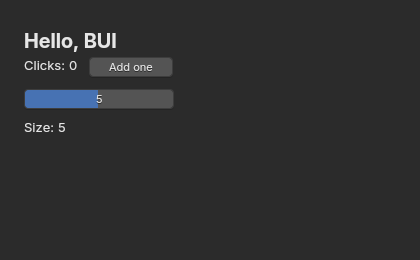
app.jsx as it first opens, rendered headless by @blender-ui/react.What’s in the code
/** @jsxImportSource @blender-ui/react */tells the JSX compiler to use BUI’s runtime for this file. For a whole project, set"jsxImportSource": "@blender-ui/react"intsconfig.jsonor your bundler’s JSX options instead.- Host components are HTML elements, as in React DOM:
<main>,<span>,<button>.classNametakes Tailwind classes, andstyleobjects work too. <NumberSlider>is one of the Blender components, the real Blender widget. The others areButton,Checkbox,Radio,NumberField,TextField,TextArea,ColorSwatch,DropdownandProgressBar.onChangefires when the slider’s value changes;e.target.valueAsNumberholds the number.render(element, options)opens a window and mounts your component. It returns{ app, window, root }.styledon the body gives the whole page Blender’s look. Without it, plain elements look like a browser’s.
The twist: hooks hold signals
useState has React’s name, arguments and timing, but the value it gives you is a signal: a box that knows who’s watching it. That changes one thing, for the better:
- Pass the signal into JSX, like
{count}or{size}, and a change updates that one text node.Counterdoesn’t re-render at all. - Read
.valuewhile rendering, likecount.value > 9, and the component re-renders when it changes, as with React.
One rule follows from it: conditions need .value. A signal is an object, so it’s always truthy.
{count.value > 0 && <p>You clicked!</p>} // right{count > 0 && <p>You clicked!</p>} // works in plain JS, but use .value{count && <p>Always shown</p>} // wrong: a signal is always truthyThis is why React on BUI costs about what the plain DOM-like API does: clicking Add one changes a single text node, with no new element tree and no diff.
Running on Node.js
Node doesn’t read JSX, so either compile it (any bundler, with jsxImportSource set to @blender-ui/react) or write the same component with createElement, as the repository’s examples/counter.js does:
const { render, createElement: h, useState } = require('@blender-ui/react')
function Counter () {  const [count, setCount] = useState(0)  return h('main', { className: 'p-6 flex flex-col gap-3' },    h('span', null, 'Clicks: ', count),    h('button', { onClick: () => setCount(c => c + 1) }, 'Add one'))}
render(h(Counter), { title: 'Counter', width: 420, height: 260 })
node app.jsShip it as one file
npx bui build app.jsxThis writes app.exe: BUI plus the small QuickJS JavaScript engine, with your bundled app appended. For a small React app on Windows x64, the repository measured a 4.9 MB executable that reaches its first frame in 68 ms.
- Bundling needs Bun installed, even if you run the app on Node. With Bun alone,
bunx bui build app.jsxworks too. - Windows builds open no console window. Add
--consoleto see yourconsole.logoutput. - QuickJS has no Node modules (
fs,net…). If your app needs them, build with--bunfor a full Bun runtime (about 115 MB). npx bui run app.jsxruns on the QuickJS runtime without making an executable.
The prebuilt runtime is for Windows x64. On other platforms, npm run build in bindings/node builds it from source.
Next steps
Last updated