
BUI for Rust
The blenderui crate gives Rust HTML, CSS, Tailwind, rsx! markup or gpui-style builders, and hooks, drawn natively with Blender's widgets. Here's the map.
- Rust
You already know how to build a UI: HTML for structure, CSS for looks, a little state to make it move. The blenderui crate lets you do exactly that in Rust, and draws the result with Blender’s widget code in a native window. No browser, no webview, no JavaScript engine.
Write it in either of two first-class syntaxes: rsx!, HTML-like markup with components and hooks, or gpui builders, method chains like div().flex().gap_2() in the style of the gpui crate. Style it with CSS, Tailwind classes or typed methods. Then decide, element by element, whether it should look like a web page or like Blender.
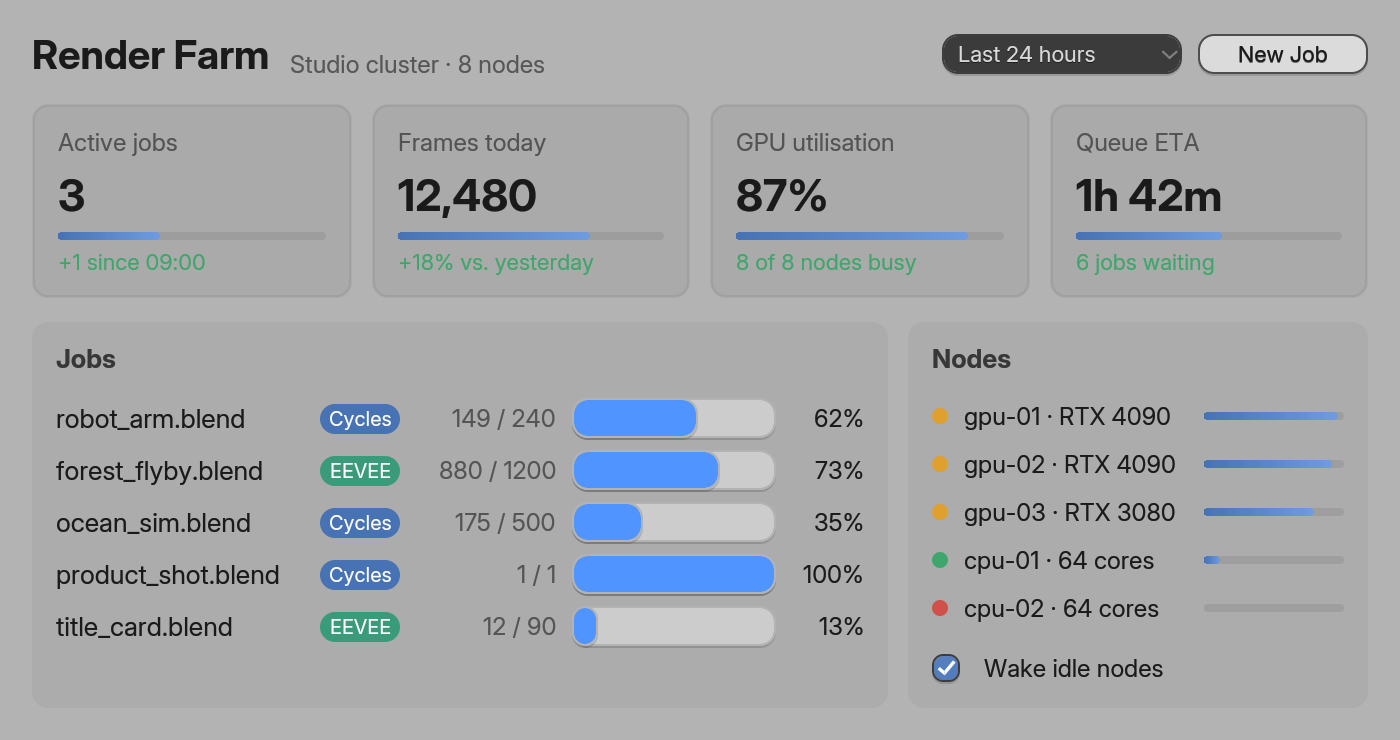
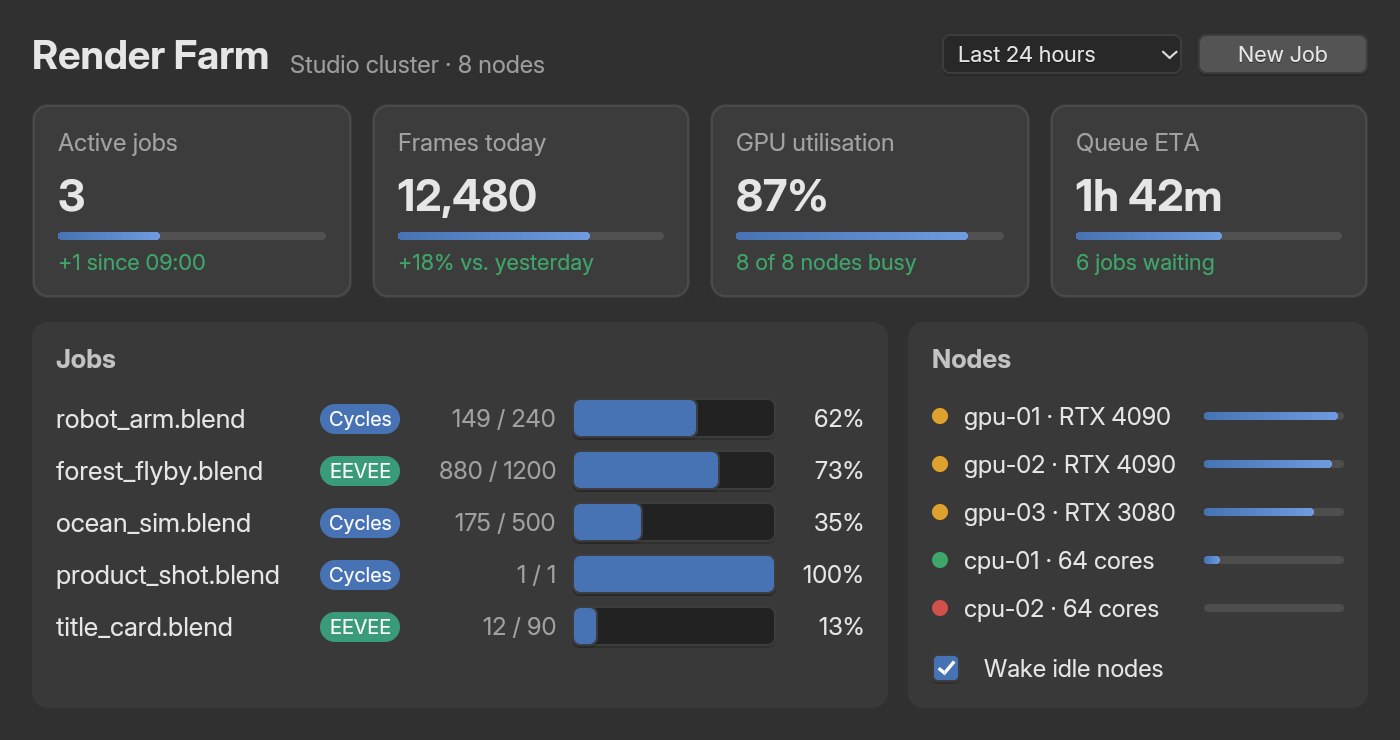
rsx! (examples/site_dashboard.rs). The builder version draws the same pixels.What’s in the crate
- Every HTML element. All 113 elements of the WHATWG index, from
div()todetails()anddialog(), plussvg()andmath()as boxes. - Real CSS.
<style>sheets, selectors up to Level 4, the cascade,var(),calc(), flexbox, grid, tables,@media,@container,@layer, animations, transitions, filters and masks. - Tailwind CSS v4.
class="md:hover:bg-sky-500/50", or bare attributes like<div p-4 bg-[#4772b3]>. A typo is a compile error that suggests the fix. rsx!and hooks. HTML-like markup,#[component]functions and hooks:use_state,signal,Memo,Effect, context.- gpui builders.
Render,div().flex().gap_2(),cx.listener(...). The same gpui-syntax file compiles against blenderui and the gpui crate. - Blender’s widgets.
<NumberSlider>,<Button>,<ColorSwatch>and friends are the real thing, with Blender’s interaction rules and Blender’s color picker. - Headless testing. Render off-screen, click, type, scroll and step animations in a normal
cargo test.
Two ways to write the same thing
Here’s one counter, two spellings. Both are complete, supported ways to write a BUI app: pick whichever reads better to you, and mix them in one app if you like. The tabs remember your choice across the Rust pages.
use blenderui::prelude::*;
#[component]fn counter(label: &str) {    let (count, set_count) = use_state(0);    rsx! {        <div flex items-center gap-3 p-4>            <span>{label.to_string()} ": " {count().to_string()}</span>            <button onClick={move || set_count(count() + 1)}>"Add one"</button>        </div>    }}
struct Hello;
impl Render for Hello {    fn render(&mut self, _: &mut Window, _: &mut Context<Self>) -> impl IntoElement {        rsx! { <body styled><counter label="Clicks" /></body> }    }}
fn main() { Application::new().run(|cx| { cx.open_window(WindowOptions::default(), |_, cx| cx.new(|_| Hello)).unwrap(); });}use blenderui::prelude::*;
struct Counter { count: i32 }
impl Render for Counter { fn render(&mut self, _window: &mut Window, cx: &mut Context<Self>) -> impl IntoElement { div().styled().flex().flex_col().gap_2().p_4() .child(h1().child(format!("Count: {}", self.count))) .child(button().child("Add one").on_click(cx.listener(|this, _, _, cx| { this.count += 1; cx.notify(); }))) }}
fn main() { Application::new().run(|cx: &mut App| { cx.open_window(WindowOptions::default(), |_, cx| cx.new(|_| Counter { count: 0 })) .unwrap(); });}rsx!keeps state in hooks (use_state) inside#[component]functions, and listeners can leave out parameters they don’t use.- gpui builders keep state in the view’s fields, and
cx.listener(...)gives the closure&mutaccess to the view;cx.notify()renders again.
Both compile to the same calls: rsx! is lowered to builder methods at compile time, so there’s no runtime parsing and no hidden cost. The rsx! and components page shows every markup rule, and gpui syntax covers the builder side and the app model.
Three looks, one element type
Every element can look one of three ways, and you choose per subtree:
- Plain HTML looks like a browser: black text on white, Chrome-style form controls.
styledgives an element and everything inside it Blender’s theme (dark by default, or light withblenderui::set_theme) and Blender’s widgets.- Blender components (
Button,NumberSlider…) are always Blender’s widgets, wherever you put them.
The three looks puts them side by side.
Get it running
Add the crate from crates.io:
cargo add blenderuiThe installation page has the details: you need Rust 1.88 or newer, CMake and a C compiler, because the first build compiles BUI’s C kit. To build against another checkout of the C sources, set BUI_SOURCE_DIR.
The examples are the fastest way to see what’s possible. From a clone of the repository:
cd bindings/rustcargo run --release --example hello # an rsx! counter, with Tailwind and a slidercargo run --example showcase # the window in the screenshotcargo run --example showcase -- --screenshot a.png # render it off-screen to a PNGcargo run --example forms # the three looks side by sidecargo run --example counter # the gpui-syntax countercargo test # unit, coverage and headless testsFind your way around
| Page | What you’ll learn |
|---|---|
| rsx! and components | Markup, control flow, #[component], props, key |
| Hooks and signals | use_state, signal, Memo, Effect, context |
| HTML elements | All 113 elements, the one Div type, attributes, images |
| CSS and Tailwind | Four ways to style, selectors, the cascade, Tailwind, coverage |
| The three looks | Browser look, styled, Blender components, form controls |
| Layout | Block, inline, flexbox, grid, tables, positioning, scrolling |
| Effects and animations | Filters, blend modes, masks, transforms, keyframes, transitions |
| Events | Listeners, focus, bubbling, the Window API, painting your own content |
| Headless testing | Off-screen windows, simulated input, screenshots, a virtual clock |
| gpui syntax | Builder syntax, the app model, entities, and how it compares to the gpui crate |
Rendering: CPU or GPU
Windows draw with BUI’s software raster by default. It draws in parallel bands; BUI_RASTER_THREADS=1 forces one thread. Ask for the GPU and you get the same pixels with the rasterizing off the CPU:
Application::new().gpu(true).run(|cx| { /* every window on the GPU */ });// or one window:cx.open_window(WindowOptions { gpu: Some(true), ..Default::default() }, build);- The GPU renderer is Direct3D 11 on Windows and OpenGL 3.3 on Linux. Elsewhere, or without a device, windows stay on the software raster.
BUI_GPU=1orBUI_GPU=0overrides both settings.window.is_gpu()turnstruea few frames in, once the device is ready.- Both renderers produce the same pixels; the
gpu_paritytest checks it. BUI_PROFILE=1prints per-phase frame times for either renderer.
Following Blender’s instanced widget batches, every primitive becomes one instance of a single shader. Text runs and images are cached in atlases, and frames render into a persistent target, so only damaged regions redraw.
Text and fonts
Text uses Blender’s UI font, Inter, embedded in the library, so it looks the same on every platform. The default family (and sans-serif, system-ui or any unknown family) is Inter. Named families such as "Segoe UI" or monospace load from the platform’s fonts. BUI_FONT=path.ttf replaces the default face, and you can register your own:
blenderui::add_font("Brand", false, false, include_bytes!("Brand-Regular.ttf"));The two bools say whether the face is bold and italic. It returns false if the bytes aren’t a font.
On the GPU, glyphs are drawn straight from their outlines with Eric Lengyel’s Slug algorithm: one quad per glyph, exact coverage in the pixel shader, no glyph bitmaps. The alternative is a per-glyph bitmap atlas, as Blender does it: about half the GPU work, but bitmaps per size.
| Slug (default) | Glyph atlas | |
|---|---|---|
| Build time | slug feature (default) |
default-features = false |
| Run time | Application::new().slug(true) or blenderui::set_slug(true) |
.slug(false) or set_slug(false) |
| Environment (overrides) | BUI_SLUG=1 |
BUI_SLUG=0 |
The gdi-text feature draws text with Windows’ GDI engine and system fonts instead.
How it works
Render::render ─► element tree (one Div type for every tag) │ cascade: UA sheet ▸ <style> sheets ▸ inline ▸ :hover/:active/:focus ▸ !important │ one handler table applies every property box tree: blocks, line boxes of words, flex/grid items, tables as flex │ taffy layout ─► absolute boxes, clips, scroll offsets │ paint ─► one display list on a kit canvas form controls ─► kit widget nodes, │ (rects, rounded rects, text, images) placed at their boxes ▼ C kit: input, hit testing, Blender widget drawing, damage rendering, native window- One implementation per property. Every style source (methods,
css!,.css,.style, sheets, the user-agent sheet, state refinements) becomes CSS declarations applied by one table of property handlers. - Work at compile time. The property table is a
const. Style methods andcss!resolve property names when your program compiles, so a typo is a compile error, and fixed values like.flex()are tokenized once per program. - No
RcorRefCell. A frame is a set of flat arenas linked by index, owned by the window and reused every frame. Entities areCopyhandles into an app-owned slot map. The only shared ownership left isArc<Image>for image pixels. - Reuse across frames.
render()builds a fresh element tree each frame, but the work behind it is reused: matched selectors are memoized, computed styles are shared, and the layout tree and widget nodes are reconciled by key, so only changed subtrees are laid out again. blenderui-sysis the raw FFI over the C kit’s header (kit/include/BUI_kit.h). Its build script builds the kit with CMake and links it statically.
Limitations at a glance
BUI’s Rust side covers a lot, but not everything. Each page lists its own gaps; here they are in one place:
- Text: floats place block boxes, but text doesn’t wrap around them. Right-to-left text is reordered but not shaped (no Arabic joining). There’s no per-glyph fallback between the faces of a
font-familylist.text-align: justifyaligns left. - Inline boxes paint their background per word; borders and padding on inline elements (
<kbd>,<code>) aren’t drawn. - Widgets draw above page content, so a
z-indexed box such as a<dialog>over a form field doesn’t cover the field. - Images are PNG only, with nearest-neighbour scaling.
video,audioandiframeshow a placeholder. - Transforms: every 2D transform draws, but clicks use the untransformed box. 3D transforms have no effect.
- Tables size columns from their widest single-line content, a simpler version of browsers’ auto layout.
- Windows are native on Windows (Win32), Linux (X11) and macOS (Cocoa). The Cocoa host is new and not yet tested on a Mac, and it needs the main thread. The GPU renderer runs on Windows and Linux.
- Components: async resources (
use_resource) and generic components are Coming soon.
Next steps
Last updated