
HTML elements
All 113 HTML elements are one Rust type with a constructor per tag. Here's what each kind draws like, and the methods every element shares.
- Rust
Every HTML tag is here: div(), section(), table(), details(), dialog(), all of them. That means you can build a Rust UI out of standard HTML elements, and it lays out and draws the way the HTML and CSS specs say.
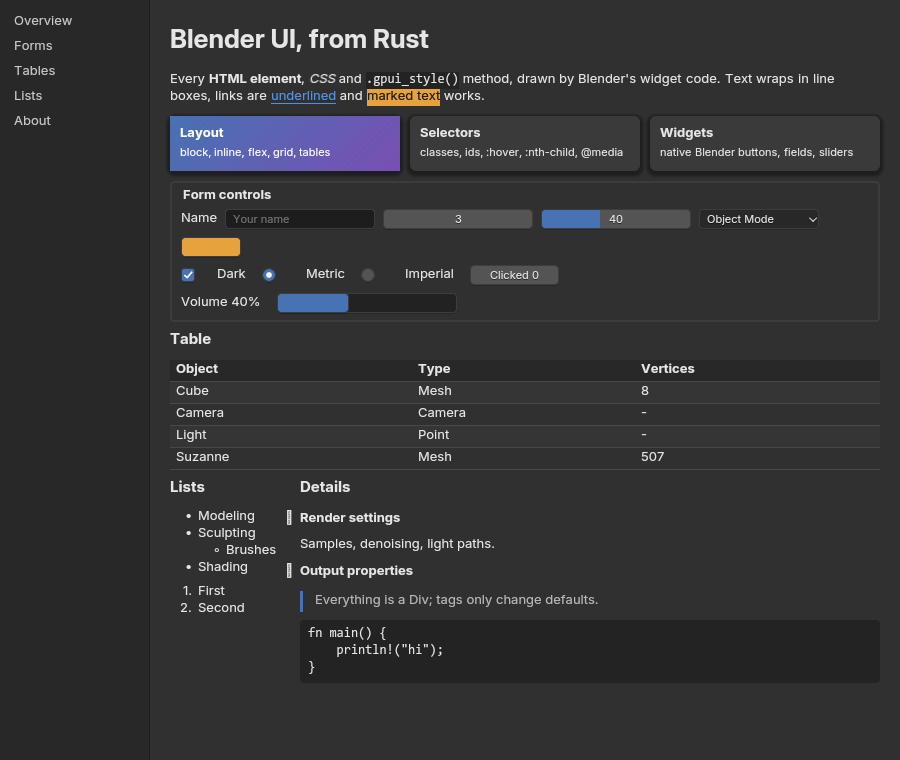
details and form controls, all plain HTML elements (examples/showcase.rs).The trick that keeps it simple: there’s one element type, Div. A tag only changes an element’s defaults: what the built-in stylesheet gives it, and whether it becomes a box, a widget or an image.
One type, every tag
There’s a constructor for every element of the WHATWG HTML index: 113 elements, plus svg() and math() as plain boxes. In rsx!, the tag name calls the constructor: <section> is section().
use blenderui::prelude::*;
fn page() -> Div {    article()        .child(h1().child("Render settings"))        .child(p().child("Samples, ").child(b().child("denoising")).child(", light paths."))        .child(ul().child(li().child("Cycles")).child(li().child("EEVEE")))}
Because every constructor returns a Div, everything on this page and on the CSS page works on every element.
What each tag draws like
| Kind | Elements | Drawn as |
|---|---|---|
| Box | div, p, h1-h6, a, span, ul / ol / li, table …, details, dialog, form … |
Laid out and painted from CSS |
| Widget | button, input, select, textarea, progress, meter, plus option, optgroup, datalist |
Form controls: browser-style, or Blender’s own widgets (the three looks) |
| Replaced | img, video, audio, iframe, embed, object, canvas |
An intrinsic size; img shows PNG files or RGBA pixels |
| Metadata | head, title, style, script, meta, link, template … |
Not drawn (<style> and <title> are read) |
| Break | br, wbr |
Line breaks |
Nine of the 113 are widgets. The full list, straight from html.rs:
- Box:
html,body,article,section,nav,aside,h1,h2,h3,h4,h5,h6,hgroup,header,footer,address,p,hr,pre,blockquote,ol,ul,menu,li,dl,dt,dd,figure,figcaption,main,search,div,a,em,strong,small,s,cite,q,dfn,abbr,ruby,rt,rp,data,time,code,var,samp,kbd,sub,sup,i,b,u,mark,bdi,bdo,span,ins,del,picture,table,caption,colgroup,col,tbody,thead,tfoot,tr,td,th,form,label,fieldset,legend,details,summary,dialog,noscript,slot,output,map,selectedcontent(and thesvg,mathroots) - Widget:
button,input,select,option,optgroup,textarea,progress,meter,datalist - Replaced:
img,iframe,embed,object,video,audio, andcanvas - Metadata:
head,title,base,link,meta,style,script,template,source,track,area - Break:
br,wbr
Custom elements
Unknown names work too, like custom elements in a browser. custom("my-widget") or Div::new("my-widget") makes an element with no built-in styles, laid out inline like a <span> until your CSS says otherwise. In rsx!, any tag with a dash does the same: <my-widget class="block h-1" />.
The document
Your view’s root is wrapped in <html><body> unless it already is one, so body { margin: 0 } and the browser defaults behave as you’d expect. Return html() with a head() when you want a stylesheet and a title up front:
html() .child(head().child(title().child("BUI showcase")).child(style().child(CSS))) .child(body().child(/* your page */))A <title> element sets the window title.
Methods every element has
| Method | What it does |
|---|---|
.child(x), .children(iter) |
Add children: elements, components or text |
.id(..) |
An id attribute and an identity that keeps the element’s state across renders |
.key(..) |
Identity without the id attribute: keeps state, but #id selectors don’t see it |
.class(..) |
Add classes (adds to any already set) |
.attr(name, value) |
Set any HTML attribute |
.styled() |
Give this subtree Blender’s look (the three looks) |
.href, .value, .placeholder, .input_type, .name, .title, .src, .alt |
Typed attributes that take text |
.checked, .disabled, .selected, .open |
Boolean attributes: true sets them, false removes them |
.min, .max, .step |
Number attributes (f64) |
.colspan |
Table cell spans (u32) |
Text children are &'static str, String or SharedString.
FluentBuilder adds conditional building, gpui-style:
div() .when(selected, |el| el.class("active")) .when_some(tooltip, |el, t| el.title(t)) .when_none(&icon, |el| el.class("no-icon")) .map(|el| if compact { el.p_1() } else { el.p_4() })Identity and state
Every render builds a fresh tree, so how does a text field remember what you typed? Give it an .id(...). Elements with an id keep their state across renders: scroll position, a text field’s contents, a checkbox you clicked, which <details> are open. Use .key(...) instead when you want the same memory without an id attribute that CSS can match.
Lists
ul and ol get bullets and numbers from list-style-type: disc, circle, square, decimal, lower-alpha, upper-roman and more. Nested lists switch bullets as browsers do (disc, then circle, then square). list-style-position, list-style-image and <ol start> work too.
ol().attr("start", "3") .child(li().child("Third")) .child(li().child("Fourth"))Details and dialogs
<details>/<summary>: clicking the summary toggles the details..open(true)sets the starting state, and with an.id(...)the open state is remembered across renders.<dialog>is hidden until you give it.open(true). It then shows as an absolutely positioned box above the page.
details().id("render").open(true) .child(summary().child("Render settings")) .child(p().child("Samples, denoising, light paths."))Inline text
Text is broken into words that wrap in line boxes, like a browser. Inline elements (b, i, a, code, mark, small, sub, sup …) style their own words, and inline-blocks and widgets sit on the line with the text. The layout page covers white-space, text-align and friends.
Two things differ from a browser: inline boxes paint their background per word, and borders and padding on inline elements such as <kbd> and <code> aren’t drawn.
Tables
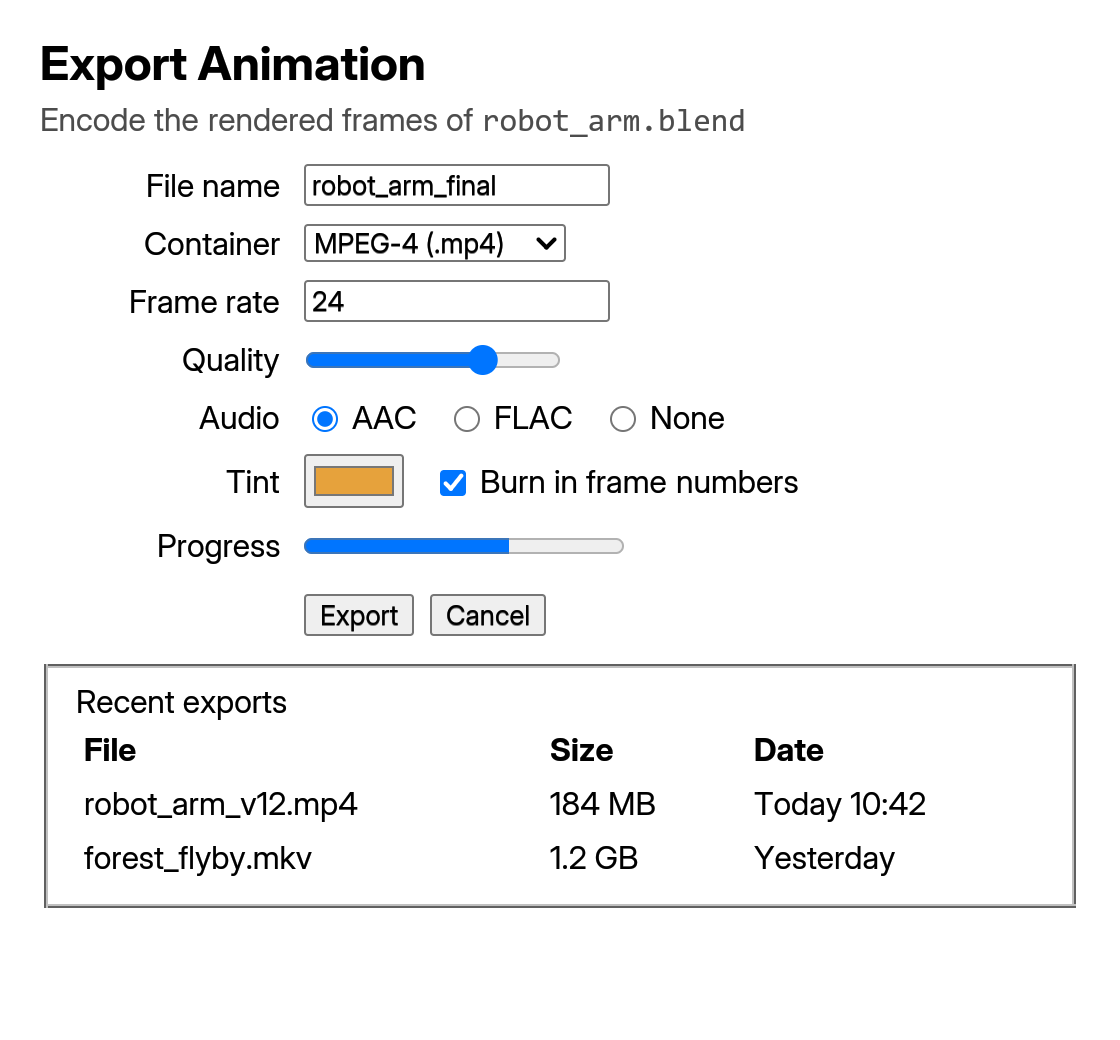
examples/site_plain_html.rs).table, thead, tbody, tfoot, tr, td, th, caption, colgroup and col all work, with colspan, border-spacing, border-collapse, caption-side and empty-cells. Columns size to their content and line up across rows. Layout has the details.
table() .child(thead().child(tr().child(th().child("Object")).child(th().child("Vertices")))) .child(tbody().children([("Cube", "8"), ("Suzanne", "507")] .map(|(o, v)| tr().child(td().child(o)).child(td().child(v)))))Images
- From a file:
img().src("file.png"). PNGs are decoded once and cached. - From pixels:
img().image_rgba(width, height, rgba), withwidth * height * 4bytes, row-major, straight alpha. - Shared pixels:
img().image(Arc<Image>)is cheap to pass every frame.Image::from_png(path)decodes a file into one.
Images are PNG only and scale with nearest-neighbour sampling. CSS object-fit, object-position and background-image: url(...) work too (CSS).
video, audio and iframe show a placeholder of their intrinsic size; there’s no media playback or embedded browsing Coming soon.
To draw your own shapes, use canvas(...): see painting your own content.
Next steps
Last updated